Disclosure: this post may contain affiliate links; AditsBlogs may earn a commission at no extra cost to you.
- Inside this guide
- What does Semrush Site Audit do?
- SEO audit for small businesses: a seven-step workflow
- 1. Define the pages and outcomes that matter
- 2. Check discovery and indexing signals
- 3. Match each page to a real customer question
- 4. Repair useful internal paths
- 5. Test mobile usability and the enquiry journey
- 6. Turn findings into an action list
- 7. Verify changes and review business outcomes
- A practical audit priority table
- Off-page SEO: earn relevant attention
- Should you use Semrush, free tools or an audit service?
- Turn your audit findings into a clearer next move
- Frequently asked questions
- Can I do a small-business SEO audit myself?
- Does a higher Semrush Site Health score guarantee rankings?
- Do I need Semrush to work with AditsBlogs?
- Will adding authority links improve SEO automatically?
A small-business SEO audit should end with a short list of useful actions—not a report you never open. If your WordPress website attracts few enquiries, start by checking whether important pages can be discovered, understood and used. Then decide which fixes deserve your time.
This guide explains a practical SEO audit for small businesses, where Semrush Site Audit can help, and how to turn findings into a manageable improvement plan. It is a research-based workflow, not a hands-on product test or a promise of higher rankings.
Affiliate disclosure: This article contains an affiliate link. AditsBlogs may earn a commission if you purchase through it. Check the destination for current pricing, eligibility and billing terms. Product screenshots are vendor examples, not results from an AditsBlogs client.
Choose five business-critical pages. Check discovery, page intent, internal links, mobile usability and the enquiry path. Record the issue, evidence, proposed fix, owner and verification method before making changes.
Need help prioritising? Explore AditsBlogs SEO audit services →
What does Semrush Site Audit do?
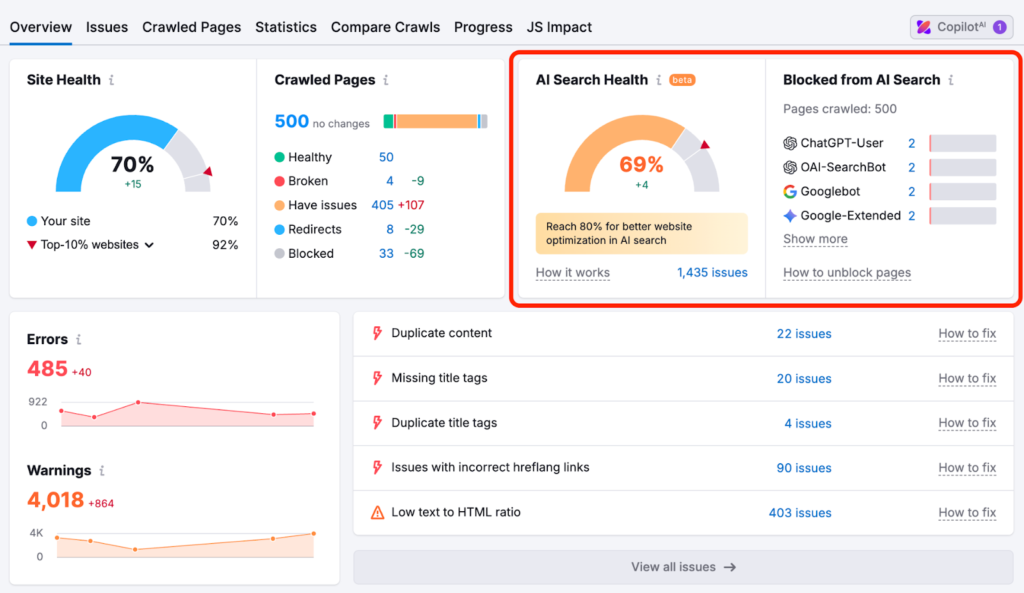
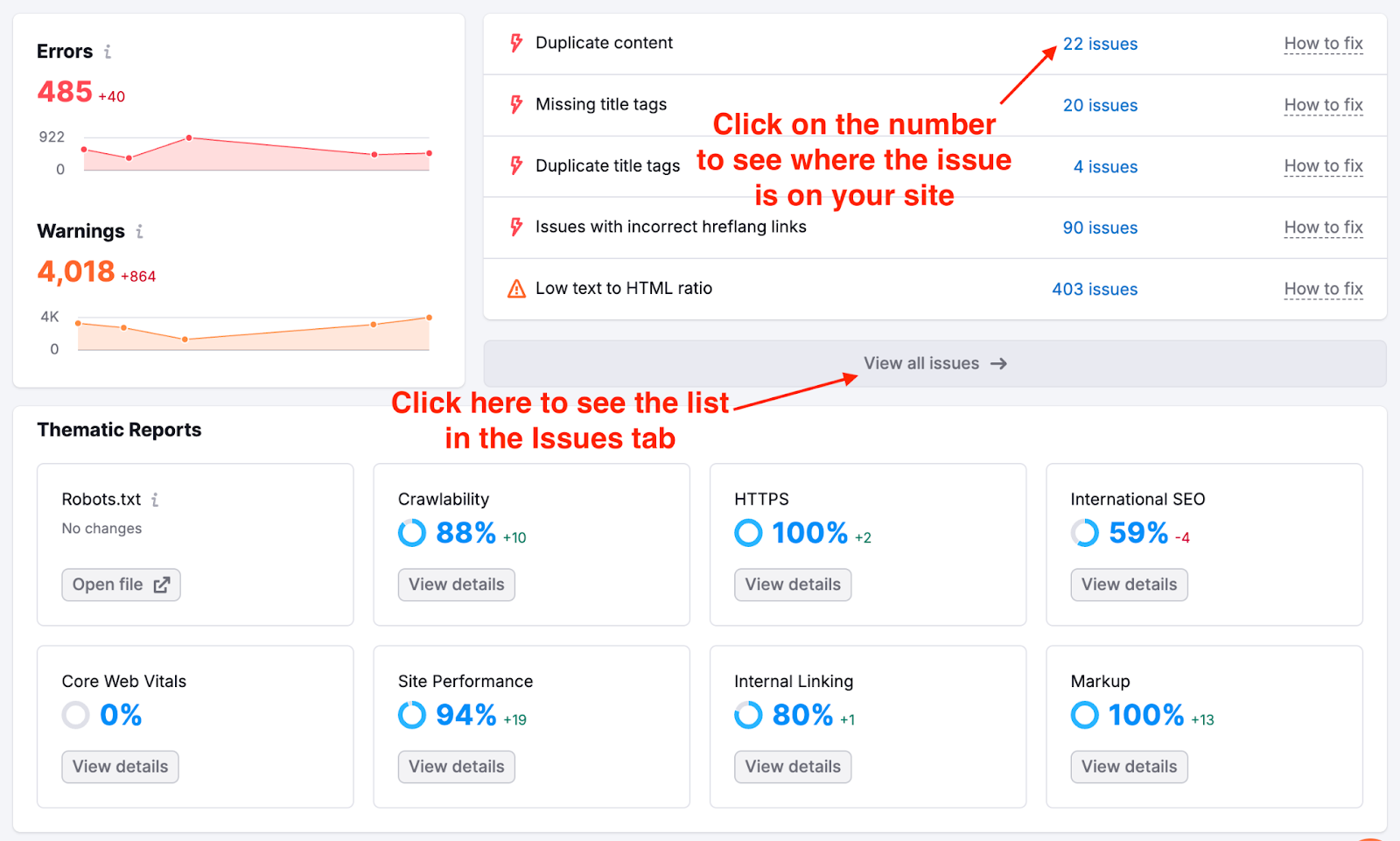
Semrush Site Audit crawls a website and groups technical findings into reports. Its documented features include a Site Health score, issue lists and thematic reports for areas such as crawlability, HTTPS, performance and internal linking. The score describes the tool’s checks; it is not a Google ranking score.
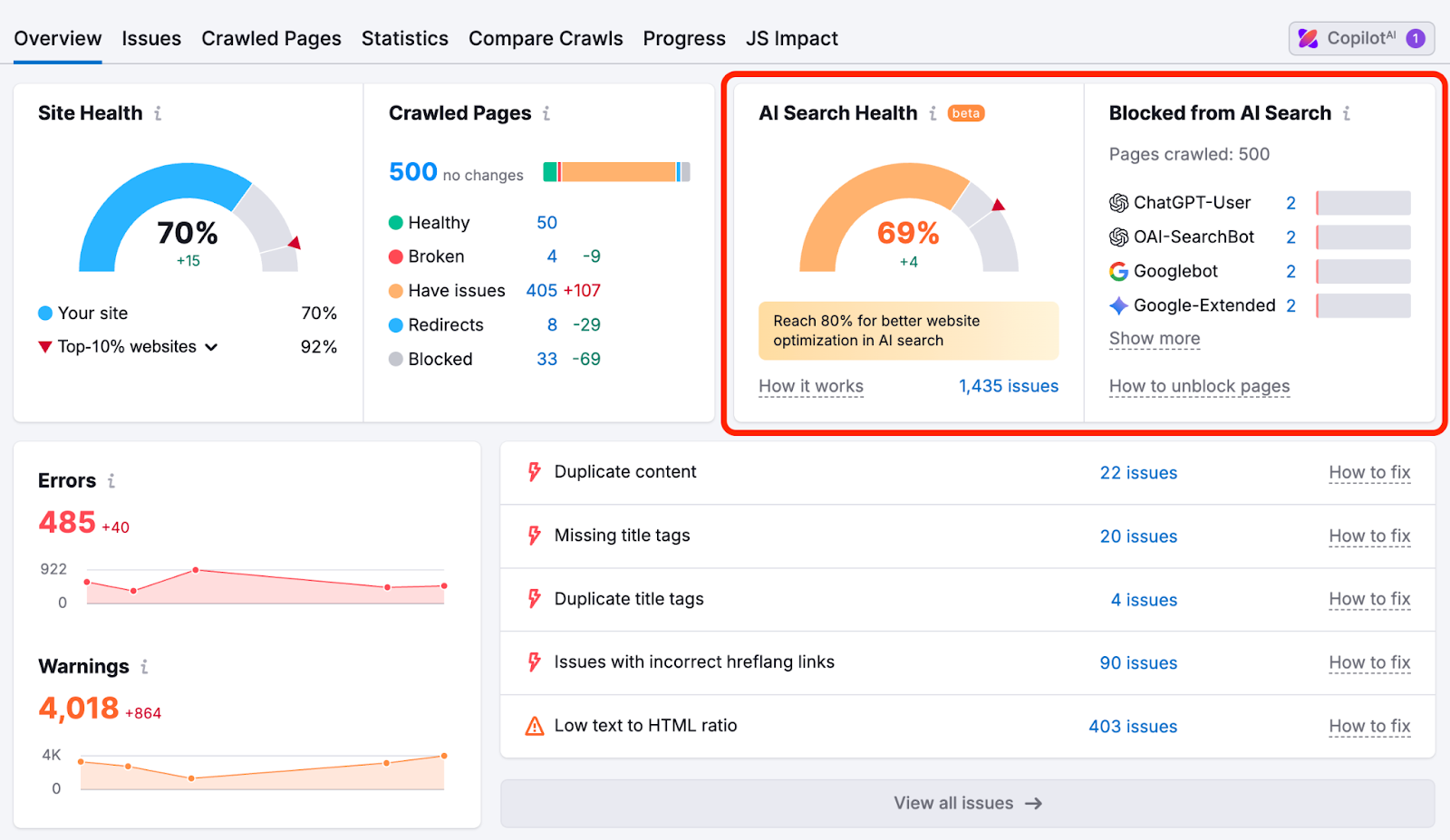
A crawler can surface patterns across many URLs. You still need to decide whether a finding matters to a page’s purpose. A broken contact-page link may deserve attention before a cosmetic issue on an old announcement.
Explore Semrush through AditsBlogs →
Compare the current product, crawl allowances, subscription cost and cancellation conditions before signing up. No specific discount or trial entitlement is promised here.
SEO audit for small businesses: a seven-step workflow
1. Define the pages and outcomes that matter
List your homepage, key service pages, contact page and a small selection of useful articles. Write one intended action beside each: request a quote, book a consultation, compare a service or find an answer. For an illustrative local design studio, the service page and enquiry form would be an appropriate starting scope.
Record a baseline from your own analytics: organic visits, enquiry submissions and the date range. Keep these measures separate from third-party estimates. Avoid treating every change in visits as proof that one SEO edit worked.
2. Check discovery and indexing signals
Review important URLs in Google Search Console and compare them with your crawl results. Check for unintended noindex instructions, broken internal links and redirects that send visitors somewhere irrelevant. Confirm that your sitemap contains the pages you want discovered.
Do not remove a robots.txt rule or change a canonical simply because an audit flags it. Some exclusions are intentional. Back up the site and involve the site owner or developer where a technical change could affect many pages.
3. Match each page to a real customer question
Read the title, main heading and first paragraph together. Can a visitor quickly understand the service, intended customer and next step? Replace vague headings with accurate descriptions. Give each page a distinct purpose rather than publishing several near-identical articles for small keyword variations.
Use a clear meta description to summarise the page honestly. Add concrete information customers need: scope, process, relevant examples and how to enquire. Google’s SEO Starter Guide is a useful reference for descriptive titles, helpful content and crawlable links.
4. Repair useful internal paths
Link relevant guides to the services they explain, using natural anchor text. Check that your important pages are reachable through the site’s navigation or contextual links. A visitor reading about website maintenance should be able to find the relevant service without searching the whole site.
When an article needs restructuring, start with our free SEO Brief Builder. Build an outline around the question you need to answer before adding more words.
5. Test mobile usability and the enquiry journey
Open the actual page on a phone. Read the text, tap the main button and submit a test enquiry. Confirm that the form reaches the correct inbox and shows a useful confirmation. Review image sizes and unnecessary scripts when performance needs attention.
A technical report is a starting point. Combine it with real page checks and performance diagnostics; a better audit score alone does not show that customers can complete their task.
6. Turn findings into an action list
Use Semrush’s issue details to identify affected URLs, then validate the problem before assigning a fix. Group repeated template issues together so you can address the cause rather than editing the same problem page by page.
7. Verify changes and review business outcomes
Recheck the affected URLs after implementation. Run another crawl when appropriate and test the customer journey again. Keep a change log so later analysis has context. Review search performance and enquiries over a meaningful period while considering seasonality and other marketing activity.
A practical audit priority table
The following examples are illustrative, not findings from a live customer audit.
| Finding | Proposed action | How to verify |
|---|---|---|
| Key enquiry button leads to a missing page | Correct its destination first | Tap the button and complete a test enquiry |
| Several service pages have the same title | Write accurate, distinct titles | Inspect the saved titles and rendered pages |
| A useful guide has no internal links pointing to it | Add relevant contextual links | Follow those links and recheck the crawl |
| Large decorative images slow a mobile page | Resize and compress suitable images | Compare diagnostics and inspect visual quality |
Off-page SEO: earn relevant attention
Publishing useful information gives others something worth referencing. Turn one part of your audit process into an original checklist, a clearly documented example or a genuinely useful resource. Share it with relevant professional communities where promotion is permitted, and contribute answers that help readers.
Maintain accurate business profiles and consider relevant industry associations or directories where your business belongs. If someone references your work without a link, a polite request for attribution may be appropriate. These are opportunities to pursue, not backlinks already secured.
Links from Google or Semrush in this article are outbound references. They do not mean those organisations link back to AditsBlogs. Avoid buying ranking links, automated directory submissions or keyword-stuffed comment campaigns. Google’s link-spam policy explains practices that can undermine search eligibility.
Should you use Semrush, free tools or an audit service?
Start with free tools when your site is small and you can review its most important pages manually. Search Console and performance diagnostics can help identify questions to investigate.
Consider Semrush when you need repeatable crawls and organised technical reports across more URLs. Compare the ongoing cost with how often you will use it. A subscription does not implement fixes for you.
Consider outside help when you have reports but need an explained priority list, or your team needs a clear scope before making changes. You should understand what the review includes and who will implement the recommendations.
Turn your audit findings into a clearer next move
AditsBlogs offers WordPress SEO audits covering technical foundations, on-page SEO, content and practical priorities within the selected package scope.
Compare audit packages and request an enquiry →
Prefer email? contact@aditsblogs.com
Confirm website size, deliverables and delivery timing before work begins. Rankings, traffic and leads cannot be guaranteed.
Frequently asked questions
Can I do a small-business SEO audit myself?
Yes. Begin with your important pages, Search Console, internal links and a manual mobile check. Ask for technical help before changing site-wide indexing or redirect settings you do not understand.
Does a higher Semrush Site Health score guarantee rankings?
No. It summarises the tool’s technical checks. Search performance also depends on relevance, content, competition and other factors.
Do I need Semrush to work with AditsBlogs?
You can enquire about the audit service without purchasing through the affiliate link. Confirm the required access and scope for your website before work starts.
Will adding authority links improve SEO automatically?
No. Cite relevant sources to support useful explanations. An outbound link is not an endorsement or a backlink from that source.
Editorial note: Product documentation checked on 19 October 2026. Features and plan terms may change. This guide contains no independently measured product performance claims or customer results.