Disclosure: this post may contain affiliate links; AditsBlogs may earn a commission at no extra cost to you.
- Quick verdict: who should try Rytr?
- What Rytr currently offers for writing
- 1. Turn your topic into a useful brief
- 2. Build an outline around reader questions
- 3. Draft one section at a time
- 4. Add the details only you can provide
- 5. Edit before thinking about SEO
- 6. Repurpose the finished article
- Rytr pricing: what to check before subscribing
- A simple test before you spend money
- Frequently asked questions
- Your next step
Affiliate disclosure: This article contains affiliate links. AditsBlogs may earn a commission if you purchase through them, at no extra cost to you. Recommendations below are based on the workflow and published product information; this is not a hands-on performance test.
You have a blog topic, a few useful points, and an empty draft. The difficult part is turning those scattered thoughts into something readers can follow. An AI writing assistant can help with that first pass, provided you bring the facts, examples, and final judgement.
This guide explains how to use Rytr for blog writing in manageable steps: define the reader, build an outline, draft individual sections, edit carefully, and prepare the finished post for WordPress. You will also find a buying checklist so you can decide whether a subscription solves a real problem in your workflow.
Quick verdict: who should try Rytr?
Rytr is worth evaluating if you regularly get stuck on opening paragraphs, alternative wording, or short promotional copy. Start with a small task and judge how much useful text remains after editing. If you already have an AI assistant that handles these tasks well, compare the same brief in both before adding another subscription.
It is a weaker fit if you expect a finished, thoroughly researched article without editorial work. A convincing paragraph can still contain an incorrect specification, an unsupported claim, or an example that never happened.
Explore Rytr through AditsBlogs
What Rytr currently offers for writing
Rytr’s official Create page describes drafting, rewriting, and voice and tone tools. Its broader website now also includes relationship and follow-up features. This article focuses on writing; you do not need to build your blogging process around those other features.
1. Turn your topic into a useful brief
“Write about blogging” leaves too many decisions to the tool. A useful brief names the reader, the problem, the desired outcome, and the evidence available. Before generating text, write these four lines yourself.
Example brief: Reader: a first-time WordPress blogger in India. Problem: they keep choosing topics that are too broad. Outcome: choose one specific topic for their next article. Evidence: my own topic shortlist and observations. Boundaries: no invented search volumes, income claims, or ranking guarantees.
For a more structured starting point, use the AditsBlogs SEO Brief Builder. Keep the brief beside your draft so every section serves the same reader.
2. Build an outline around reader questions
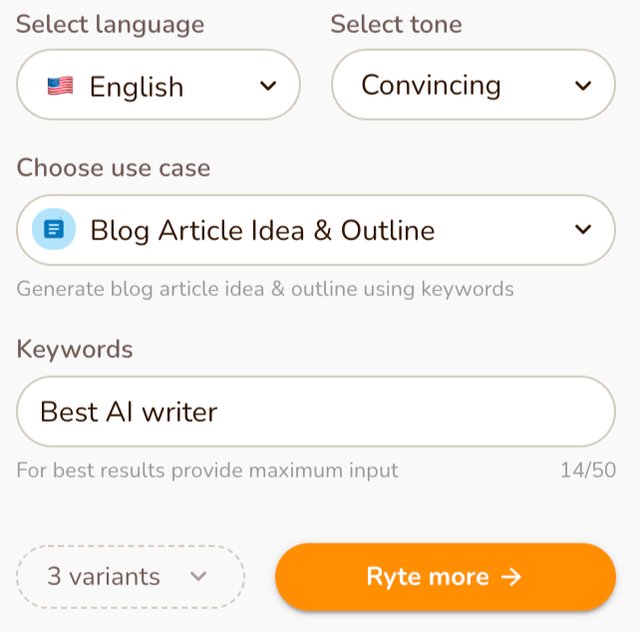
Source: Rytr’s official long-form writing help guide. Official documentation example; the interface in your account may differ.
Plan the article before filling it with paragraphs. For the example above, useful sections might cover choosing an audience, narrowing a topic, checking what existing search results answer, and selecting a practical angle. Remove sections that merely repeat the introduction.
Suggested instruction to adapt: “Create an outline for a beginner guide about choosing a first blog topic. Include a worked example and common mistakes. Keep the scope narrow. Do not invent statistics.” Use the closest writing option available in your account; interface labels can change.
Review the outline yourself. Does it answer the main question early? Does it include the steps someone needs to act? A short, complete outline is more useful than a long list of headings added only to increase word count.
3. Draft one section at a time
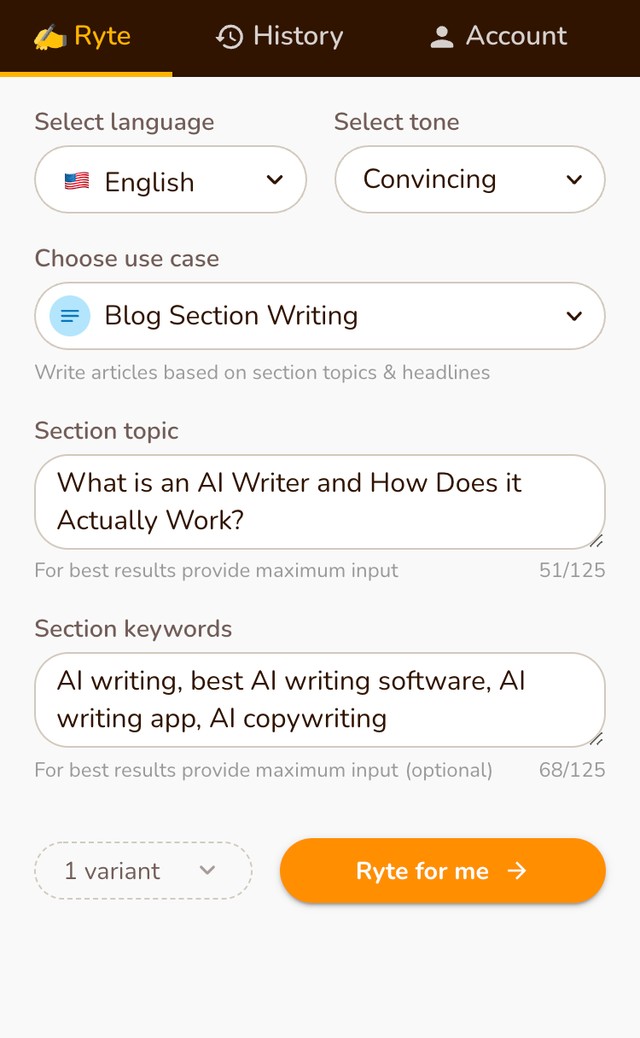
Source: Rytr’s official long-form writing help guide. Official documentation example; the interface in your account may differ.
Work on a single section with the facts it needs. This makes it easier to spot repetition and control the direction. For example, provide three broad topics from your own shortlist and ask for narrower alternatives for each. Choose the ones you can actually support with experience or research.
Example instruction: “Explain how to narrow ‘personal finance’ into a specific beginner blog topic. Use a fictional example, clearly labelled. Keep the explanation to two short paragraphs. Do not give investment advice or promise earnings.”
These are suggested instructions, not recorded Rytr outputs. Adapt their length to the input limits and options in your account. Save useful drafts separately so you can compare revisions without losing your original ideas.
4. Add the details only you can provide
Replace generic statements with a real observation, a documented example, or a source the reader can inspect. If a tool suggests “this method doubled my traffic,” remove it unless you have records supporting that exact statement. Never turn an illustrative example into a personal success story.
For product articles, check the manufacturer’s documentation and the exact plan or model being discussed. For tutorials, confirm that the menu names and steps match the current interface. Link directly to supporting sources near the relevant claim.
This is also where your voice matters. Keep familiar words, explain unfamiliar terms, and remove lines you would never say to your audience. Our guide to improving writing skills covers habits that remain useful with or without AI.
5. Edit before thinking about SEO
Read the draft from beginning to end. Check that the introduction answers the promise in the title, each heading adds something new, and the conclusion gives a useful next step. Delete repeated advice, filler openings, and claims that sound stronger than the evidence.
Final editorial check: Verify names, dates, numbers, quotations, links, and product details. Label fictional examples. Check image permissions and alt text. Review any similarity concerns yourself; an automated check does not establish accuracy or permission to reuse material.
Then write a clear title and description that reflect the finished article. Use your main topic naturally. Neither Rytr nor a particular keyword pattern guarantees Google rankings, traffic, engagement, or affiliate sales.
6. Repurpose the finished article
Once the article is accurate, use its main lesson as the basis for a newsletter introduction or social caption. Supply the finished text rather than asking the assistant to recreate it from the title alone. Check that the shorter version preserves important qualifications.
For example, a caption about choosing a blog topic could share one before-and-after topic example, explain why the narrower angle helps, and link to the full guide. That gives readers something useful before asking them to click.
Rytr pricing: what to check before subscribing
On 28 October 2026, Rytr’s official pricing page lists Free, Lite, Personal, and Pro. Free includes 10,000 characters per month. Listed monthly prices are $9 for Lite, $19 for Personal, and $49 for Pro. Lite removes the monthly character limit; higher tiers add communication and relationship features. Annual billing is advertised with a 20% saving and is billed annually.
Prices are in US dollars. Confirm the billing cycle, final checkout amount, applicable taxes, payment conversion, cancellation terms, and features before paying. Characters are not words, so the free allowance should not be treated as a guaranteed number of complete articles.
For a writing-only workflow, test Free first and evaluate Lite if the character allowance becomes the actual bottleneck. Paying for a higher tier makes sense only when you need its additional features.
A simple test before you spend money
Use one outline, one introduction, and one difficult section from an article you already understand. Record the time spent writing the brief, generating text, verifying it, and editing it. Compare the finished result with your usual process.
Ask three questions: Did the tool help me get started? Did the output need less work than writing from scratch? Would I use it often enough to justify another recurring bill? If the answers are unclear, continue with the free option or your existing tools.
Check Rytr’s current plans and try the writing workflow
Frequently asked questions
Can Rytr write an entire blog post?
An AI assistant can help draft text, but a complete article still needs a coherent brief, reliable sources, original input, and human editing. This guide recommends working section by section.
Is Rytr free?
The current official pricing page lists a free plan with a monthly character allowance. Check the page for current limits before signing up.
Will using Rytr make my article rank?
No ranking outcome is guaranteed. Useful content, accurate information, relevant search intent, and the wider condition of your website all matter.
Should I buy it if I already use another AI writer?
Compare the same real task in both. Subscribe only if the output, convenience, or workflow improves enough to justify the cost.
Your next step
Choose one unfinished article and prepare a four-line brief. Test whether Rytr helps you turn that brief into a clearer draft, then edit it until every claim and example earns its place. You can explore the tool using the AditsBlogs Rytr affiliate link. Start small and let the quality of your finished work guide the buying decision.
STAY CONNECTED
More from AditsBlogs, in your inbox
Get occasional updates on new guides, tools, games and creative posts.