
Video Is King — But Editing Is the Barrier
Let’s be honest.
- What Is InVideo AI?
- Why InVideo Is Exploding in 2026
- Prompt-Based Video Creation
- 5000+ Ready Templates
- AI Voiceover in Multiple Languages
- Massive Stock Media Library
- Who Should Use InVideo?
- InVideo vs Traditional Editing Software
- Real Benefits You’ll Notice
- Where InVideo Falls Short
- Is InVideo Worth It?
- How to Get the Best Results from InVideo
- Final Verdict
- Ready to Try It?
- 📧 Get New Posts by Email
You know video content converts better.
You know short-form videos dominate reach.
You know brands using video grow faster.
But editing?
SEMrush – SEO & marketing toolkit
All‑in‑one platform for keyword ideas, competitor research, basic site audits, and simple tracking of your search visibility.
Amazon – creator & work gear
Browse laptops, microphones, lighting, and other basic tools that can support blogging, recording, or work‑from‑home setups.
Some links above are affiliate links. If you choose to purchase through them, it can support this site at no extra cost to you.
That’s where most creators, bloggers, and business owners get stuck.
Expensive software.
Complicated timelines.
Hours of editing for one 60-second clip.
This is exactly where InVideo AI changes the game.
Instead of editing videos manually, you simply describe what you want — and the platform builds it for you.
Yes, from just a prompt.
In this guide, we’ll break down:
- What InVideo AI actually does
- Who it’s best for
- Real advantages & limitations
- How it compares to traditional editors
- Whether it’s worth your money
Let’s dive in.
What Is InVideo AI?
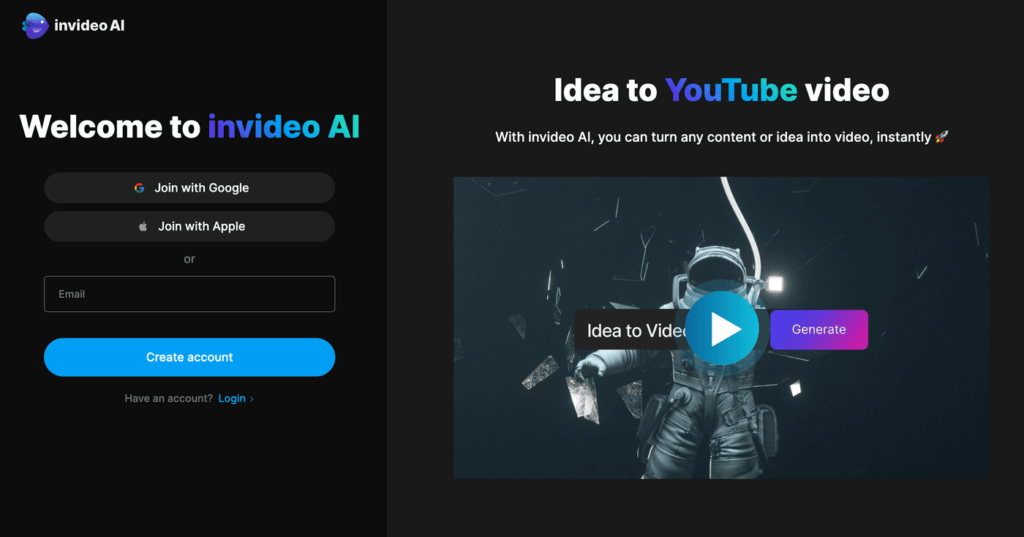
InVideo is an AI-powered video creation platform that turns text prompts into complete videos — including visuals, voiceover, transitions, captions, and background music.
Instead of dragging clips onto a timeline, you type something like:
“Create a 30-second Instagram Reel about SEO tips for beginners with energetic music.”
And within minutes, the AI generates:
- Script
- Stock footage
- AI voiceover
- Subtitles
- Music
- Scene transitions
All editable.
No advanced editing knowledge required.
If you’re already using AI for content, check out our guide on best AI writing tools for bloggers to scale even faster.
Why InVideo Is Exploding in 2026
Video creation tools are everywhere. So why is InVideo gaining serious momentum?
Prompt-Based Video Creation
Unlike traditional editors like Adobe Premiere Pro or Final Cut Pro, InVideo AI doesn’t require timeline editing skills.
It works like ChatGPT — but for video.
Type → Generate → Edit → Export.
5000+ Ready Templates
Whether you’re creating:
- YouTube intros
- Instagram Reels
- Facebook ads
- Product promos
- Explainer videos
There are professionally designed templates ready to customize.
This alone saves hours.
AI Voiceover in Multiple Languages
You can generate natural-sounding voiceovers without hiring freelancers.
Perfect for:
- Faceless YouTube channels
- Affiliate marketing videos
- Educational explainers
- Product reviews
For bloggers looking to repurpose written content into video, this is gold.
Massive Stock Media Library
You don’t need to buy separate stock subscriptions.
InVideo provides:
- Premium stock footage
- Images
- Music tracks
- Animated elements
All inside the platform.
That reduces your overall content creation cost significantly.
Who Should Use InVideo?
InVideo is ideal for:
✔ Bloggers
Turn your blog posts into YouTube videos or Pinterest Idea Pins.
✔ Affiliate Marketers
Create product demos, review videos, and comparison reels.
✔ Small Business Owners
Make ads without hiring agencies.
✔ Social Media Managers
Scale content production quickly.
✔ Coaches & Educators
Build explainers, reels, and short lessons in minutes.
If you run a content-based site like AditsBlogs, this tool can multiply your reach across platforms.
Serious creators combine video with SEO using SEMrush for keyword research to dominate Google rankings.
InVideo vs Traditional Editing Software
| Feature | InVideo AI | Traditional Editors |
|---|---|---|
| Learning Curve | Very Low | High |
| AI Script Generation | Yes | No |
| Built-in Stock Media | Yes | Usually No |
| Manual Timeline Control | Limited | Full |
| Best For | Fast Content | Advanced Production |
If you’re making cinematic films — go traditional.
If you want speed + volume — InVideo wins.
Real Benefits You’ll Notice
- Faster content production
- Lower video creation costs
- No editing stress
- Scalable content output
- AI-generated captions (great for engagement)
- Easy resizing for multiple platforms
For marketers, speed = opportunity.
And InVideo is built for speed.
Where InVideo Falls Short
Let’s be honest — no tool is perfect.
- Limited deep manual editing control
- AI sometimes needs script refinement
- Premium features locked behind paid plans
If you want complete cinematic control, you may feel restricted.
But for 90% of creators, it’s more than enough.
Is InVideo Worth It?
If you:
- Struggle with editing
- Want to scale video content
- Need faceless YouTube automation
- Run ads or affiliate campaigns
- Repurpose blog content into video
Then yes — it’s absolutely worth trying.
Compared to hiring a freelance editor (₹2000–₹5000 per video), it’s extremely affordable.
How to Get the Best Results from InVideo
Here’s a pro tip:
Instead of typing vague prompts like:
“Make a marketing video.”
Use structured prompts:
- Define platform (Instagram Reel / YouTube Short)
- Mention tone (energetic / professional / cinematic)
- Mention audience
- Specify duration
The better your prompt — the better the video.
Final Verdict
Video is no longer optional.
And AI has removed the biggest barrier — editing complexity.
InVideo AI is not just another editing tool.
It’s a content acceleration engine.
If you’re serious about:
- Growing on YouTube
- Increasing engagement
- Repurposing blog content
- Scaling affiliate conversions
Then this tool deserves your attention.
Ready to Try It?
Start with a simple project:
Take one of your blog posts.
Turn it into a 60-second Reel.
Post it on 3 platforms.
Watch what happens.
Because in 2026 — creators who use AI tools will outpace those who don’t.

About Aditya Singh
I write content on Blogging, Digital Marketing, Tech, and Life- skills. I also write Poetry and Short-Stories in my free time.
Related products on Amazon
Suggestions loosely based on this article
Affiliate note: Some links below are affiliate links. If you choose to buy through them, it can support this site at no extra cost to you.


Product details and prices are taken from Amazon pages and can change over time.